🌐
How Does the Internet Actually Work?
You use it every minute of the day — but have you ever wondered what really happens when you open a website, send a message, or stream a video?
Every time you type a web address and press Enter, something almost magical happens in a fraction of a second. Your request zips across the planet, bounces through dozens of machines, and comes back with exactly the page you asked for.
But there is no magic — just a beautifully organised system of wires, rules, and addresses. Let’s walk through it together, step by simple step.
🌍 Quick Scale Check
As of 2025, over 5.5 billion people use the internet — that is roughly 68% of all humans on Earth. Every second, about 3.5 million emails and 1 million videos are sent across it.
1 What Is the Internet, Really?
People often confuse the “internet” with the “web.” They are related, but not the same thing.
🕸️
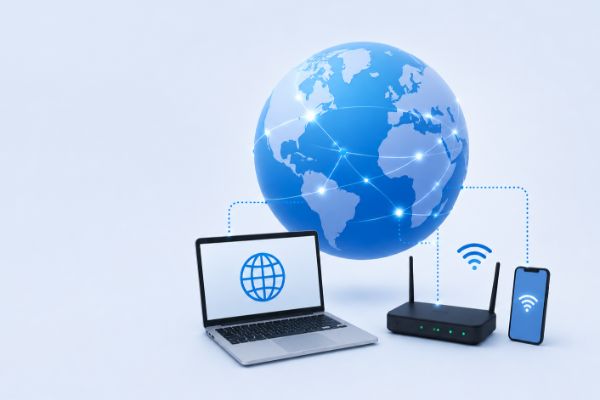
The Internet
The physical network — cables, routers, and wireless signals connecting billions of devices worldwide
🌐
The World Wide Web
A collection of websites and pages that live on the internet — just one of many things the internet carries
📧
Email
Another service that travels over the internet — separate from the web
🎮
Online Gaming
Yet another service — your game data travels over the same internet infrastructure
🚗 Think of it like roads and cars
The
internet is the road network — highways, streets, and bridges. The
web is just one type of vehicle using those roads. Emails, videos, and games are other vehicles. The roads exist no matter what is driving on them.
2 The Physical Internet: It’s Actually Cables
Here is something that surprises most people: most of the internet is made of physical cables buried underground or stretched across the ocean floor.
🏠
Your Home
A cable or fibre optic wire connects your home to your
ISPISP stands for Internet Service Provider — a company like BT, Virgin, or Comcast that sells you internet access and connects you to the wider network.
.
🏢
ISP Network
Your ISP connects to larger networks with bigger cables, creating a regional web of connections.
🌊
Undersea Cables
When data travels between continents, it goes through
submarine cablesUndersea cables are thick bundles of fibre optic wires laid on the ocean floor. They carry over 95% of all international internet traffic — far more than satellites.
— physical wires running along the bottom of the ocean. There are over 530 of these cables crisscrossing every ocean right now.
📡
Wireless Last Mile
Wi-Fi and mobile data use radio waves for the short hop between a router or tower and your device. But even those towers are plugged into physical cables.
🤯 Mind-Blowing Fact
The undersea cables that carry the internet are often no wider than a garden hose, yet they carry terabits of data per second — enough to stream millions of HD videos simultaneously.
3 How Data Actually Travels: Packets
Imagine you want to send a very long letter to a friend across the country. Instead of using one giant envelope, you tear the letter into 100 small pieces, put each piece in a separate envelope with a “piece number” on it, and send them all off. Your friend receives them, puts them back in order, and reads the full letter.
That is almost exactly how the internet works. Everything — web pages, videos, messages — is broken into tiny chunks called packets.
Watch packets travel from your device to a server →
📱 Your Device
🌐 Internet
🖥️ Server
1
Breaking Up
Your device splits the data into packets. Each packet gets a header — like an address label — containing where it came from, where it is going, and its sequence number.
2
Routing
Each packet is sent into the network.
RoutersA router is a device that reads the address on each packet and decides which direction to send it next — like a traffic officer at a busy junction.
along the way read the address and forward each packet toward its destination. Different packets may travel different paths!
3
Reassembly
When all packets arrive at the destination, the receiving computer uses the sequence numbers to put them back in the correct order. If any packet is missing, it asks for it to be sent again.
⚡ How Fast?
A typical web page request involves hundreds of packets, yet the whole round trip — from your device to the server and back — usually happens in under 100 milliseconds. That is faster than the blink of an eye (which takes about 150–400 ms).
4 The Language of the Internet: Protocols
Imagine millions of different devices — phones, laptops, smart fridges, servers — all trying to communicate. For any of this to work, they all need to follow the same rules. These rules are called protocols
The internet is built on layers, and each layer has its own protocol:
🌐
HTTP / HTTPS — The Web Language
When you visit a website, your browser uses HTTPHTTP (HyperText Transfer Protocol) is the set of rules browsers and web servers use to request and send web pages. HTTPS is the secure version — all data is encrypted so nobody can snoop on it.
to ask for the page and the server uses it to send the page back. HTTPS adds encryption so your data stays private.
📬
TCP — The Reliable Delivery Service
TCPTCP (Transmission Control Protocol) makes sure every packet arrives correctly and in order. If a packet is lost, TCP automatically requests it again. Think of it as a certified postal service.
makes sure every packet arrives correctly. It handles the breaking-up and reassembly of data, and asks for missing packets to be re-sent.
📍
IP — The Address System
The Internet ProtocolIP (Internet Protocol) assigns a unique address — called an IP address — to every device on the internet. Data packets use IP addresses to find their way across the network, just like postal addresses on letters.
gives every device a unique address (like a postal address) and makes sure packets are routed toward the right destination.
📶
Wi-Fi / Ethernet — The Physical Link
This layer handles the actual physical transmission — radio waves (Wi-Fi) or electrical signals through cables (Ethernet) carrying your data between you and the next router.
📮 The Postal Analogy
Think of
IP as the postal address on the envelope,
TCP as the postal service that guarantees delivery and tracks lost mail,
HTTP as the specific language the letter is written in, and
Wi-Fi/Ethernet as the actual van that physically carries the envelope.
5 What Happens When You Type a Web Address?
Let’s trace exactly what happens when you type wewillexplain.com and press Enter. It all happens in under a second — here are the steps:
① First, your browser needs to find the IP address for the domain name:
🖥️ Your Browser
asks for IP of wewillexplain.com
→
📖 DNS Server
looks up the address book
→
✅ Returns IP
e.g. 104.21.45.87
1
DNS Lookup
Computers talk in numbers, not words. A
DNS serverDNS stands for Domain Name System. It works like the internet’s phone book — it translates human-friendly domain names (like google.com) into numerical IP addresses that computers use to find each other.
translates “wewillexplain.com” into a numerical
IP addressAn IP address is a unique numerical label like 192.168.1.1 assigned to every device connected to the internet. IPv4 addresses have four groups of numbers; newer IPv6 addresses are longer to support more devices.
that routers can use.
2
TCP Connection
Your browser and the web server do a quick “handshake” — three messages back and forth — to establish a reliable connection before any real data is sent.
3
HTTP Request
Your browser sends an HTTP GET request: “Please send me the homepage.” This tiny message travels as packets across the internet to the server.
4
Server Response
The server receives the request, retrieves the webpage files (HTML, CSS, images), and sends them back as hundreds of packets.
5
Your Browser Builds the Page
Packets arrive, get reassembled, and your browser reads the
HTMLHTML (HyperText Markup Language) is the code that defines the structure and content of a webpage — headings, paragraphs, images, and links.
and
CSSCSS (Cascading Style Sheets) is the code that controls how a webpage looks — colours, fonts, spacing, and layout. Without CSS, websites would just be plain black text on a white background.
to draw the page you see on screen.
⚡ Your request’s journey in under 100ms
📱
Your Device
sends request
→
→
→
🌊
Backbone
long-haul cable
→
🖥️
Web Server
returns page
6 IP Addresses: The Internet’s House Numbers
Every device on the internet needs a unique address so data can find its way to the right place. This is called an IP address.
| Type | Example | What It Means |
|---|
| IPv4 | 192.168.0.1 | The older format — 4 numbers separated by dots. Supports ~4.3 billion addresses |
| IPv6 | 2001:0db8::1 | The newer format — much longer, supports 340 undecillion addresses (enough for every grain of sand on Earth to have one) |
| Public IP | 103.45.22.10 | Your home’s address on the open internet, assigned by your ISP |
| Private IP | 192.168.1.5 | Your device’s address within your home network — not visible outside your router |
📦 Why Did We Need IPv6?
The original IPv4 system could only support about 4.3 billion unique addresses. As billions of phones, computers, smart devices, and servers all needed their own addresses, we quickly ran out. IPv6 solves this with an astronomically larger address space.
7 Who Owns and Controls the Internet?
Here is something that surprises people: nobody owns the internet. No single government, company, or organisation controls it.
Instead, it is a cooperative system:
🏛️
ICANN
Manages domain names and IP address assignment globally
🏢
ISPs
Own the cables and infrastructure in their regions, and sell access to consumers
🤝
Peering Agreements
ISPs connect to each other at exchange points to route traffic between networks
🔬
Standards Bodies
Groups like the IETF create the technical protocols everyone agrees to follow
🛣️ Like the Global Road Network
No one owns all the world’s roads. Different countries, councils, and companies own different stretches. But they all follow shared rules (drive on the left or right, use the same road signs) so that a car can travel seamlessly from one country to another. The internet works the same way.
8 Security: How Does HTTPS Protect You?
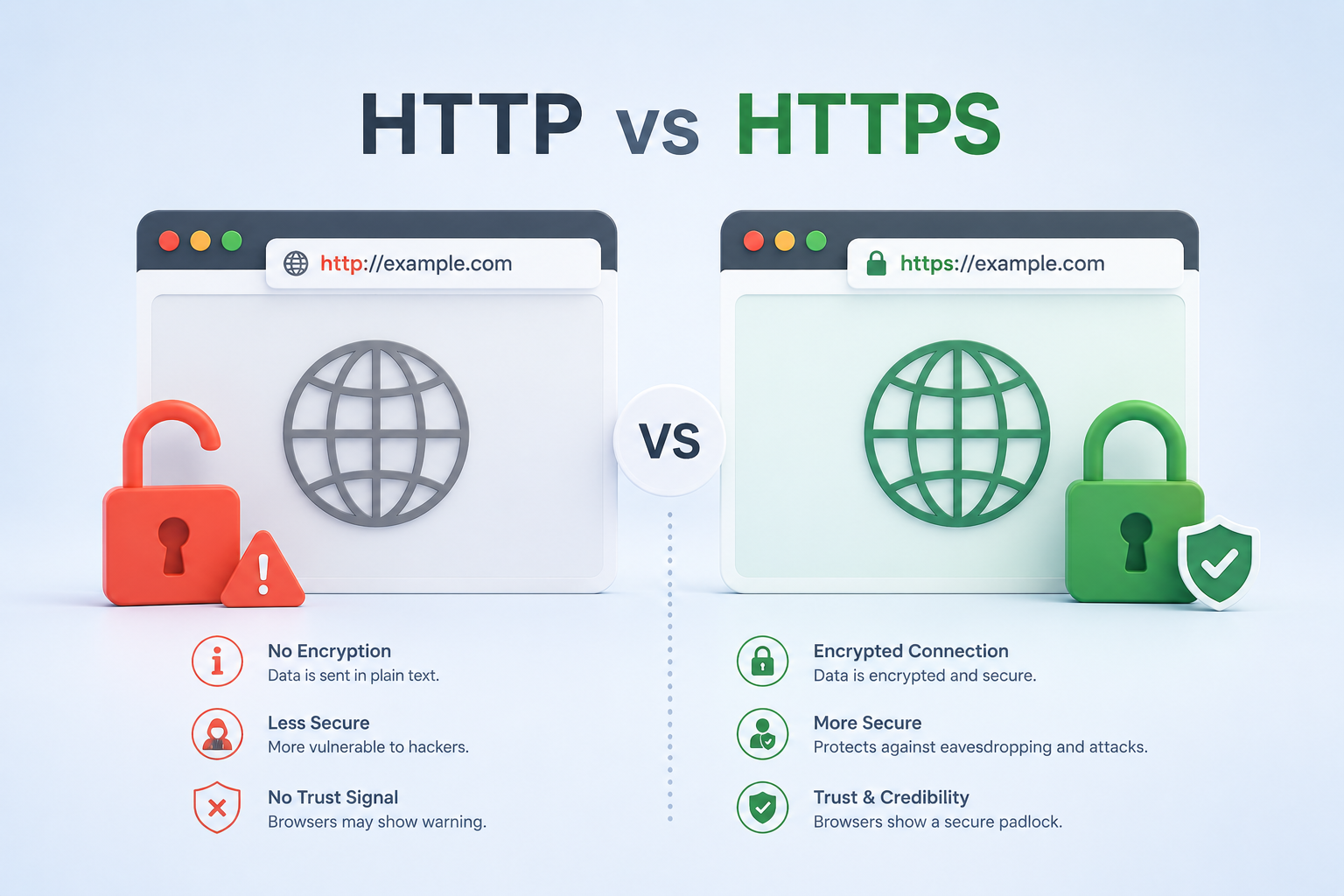
When you see https:// at the start of a web address — or a padlock icon in your browser — it means your connection is encrypted. But what does that actually mean?
🔒
Without Encryption (HTTP)
Data travels as plain text. Anyone on the same network — at a coffee shop, for example — could potentially read it, including your passwords.
🔐
With Encryption (HTTPS)
Data is scrambled using
TLS encryptionTLS (Transport Layer Security) is the encryption technology behind HTTPS. It scrambles your data so that only the intended server can read it. Even if someone intercepts the packets, they see only meaningless jumbled characters.
. Even if someone intercepts your packets, they see only meaningless random characters. Only the website’s server holds the key to decode it.
📜
SSL Certificates
Websites prove their identity using a digital certificate — like an official ID card — issued by a trusted organisation. Your browser checks this certificate automatically.
💡 Good habit: Always check for https:// and the padlock before entering a password or payment details. If you see “Not Secure” in your browser, avoid entering anything sensitive.
9 What About the Cloud?
You have probably heard “it’s saved in the cloud.” What does that actually mean?
The cloud is simply someone else’s computer — or more accurately, massive warehouses full of computers called data centres. Companies like Amazon (AWS), Google, and Microsoft run enormous data centres around the world.
📸
Your Photos
When you back up photos to Google Photos, they travel over the internet and are stored on Google’s servers
🎵
Streaming Music
Songs on Spotify live on their servers. When you press play, the audio streams to you in real time as packets
📄
Online Documents
Google Docs stores your files on Google’s servers. Every keystroke is saved to the cloud as you type
📹
Video Calls
Video on Zoom or Teams is compressed into packets and streamed live between all participants via servers
🎯 Let’s Wrap It Up
- The internet is a global network of physical cables (and some wireless links) connecting billions of devices.
- Data is broken into tiny packets, each with an address label, that travel independently and get reassembled at the destination.
- A DNS server acts as the internet’s phone book, translating domain names into IP addresses.
- Protocols like TCP/IP and HTTP are the shared rules that allow any device to communicate with any other device.
- HTTPS encryption scrambles your data so it stays private as it crosses the internet.
- The cloud is just other people’s computers — powerful servers in data centres around the world.
- Nobody owns the whole internet. It is a cooperative system run by thousands of organisations following shared standards.
💡 Tap on any underlined word to see its explanation.