What is Cloud Computing?
And Where is the Cloud?
No jargon. No confusion. Just the simple truth about where your files actually live — and why it matters.
The Simple Answer
Let’s Start From Zero
You’ve heard the word “cloud” a thousand times. Your photos are “in the cloud.” Your documents are “saved to the cloud.” But what does that actually mean?
“Cloud computing simply means using someone else’s powerful computers — connected over the internet — to store, process, and manage your data, instead of doing it on your own device.”
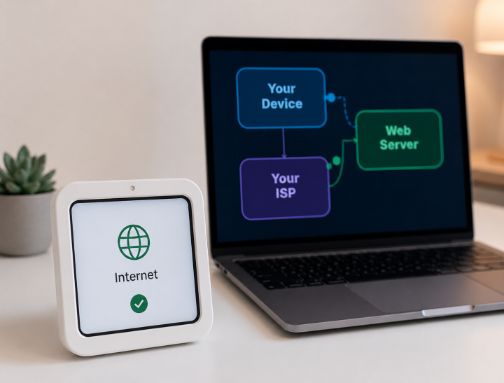
The word “cloud” is actually just a metaphor — a friendly way to say the internet. When your data goes to “the cloud,” it travels through the internet to a real, physical computer somewhere in the world.
That physical location is called a data centre — a giant warehouse packed with thousands of servers (powerful computers) running 24 hours a day.
Without the Cloud
Everything lives on your device. If your phone dies or your laptop breaks, you might lose everything. You need more storage? Buy a bigger hard drive.
With the Cloud
Your data lives on someone else’s powerful servers. Any device can access it. It doesn’t matter if your phone breaks — your photos are safe online.
The Big Question
Where Exactly Is “The Cloud”?
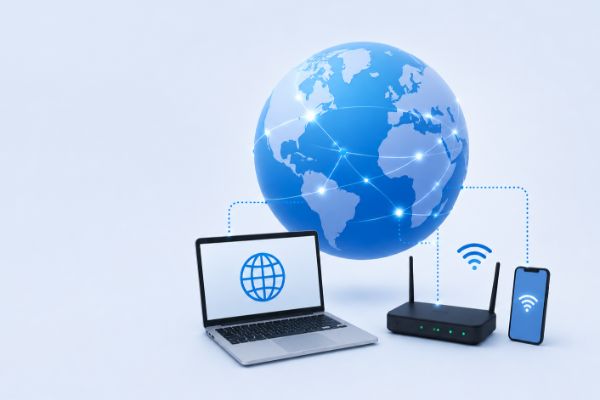
The cloud is not floating in the sky. It’s not magic. It is a network of massive physical buildings — data centres — spread across the globe. Companies like Amazon, Google, and Microsoft own and operate these giant facilities.
Every device connects to the same data centres over the internet — that’s the cloud!
The Best Analogy
Think of It Like Electricity
You don’t generate your own electricity at home. You don’t build your own power plant. You simply plug in and use electricity that’s generated somewhere else — and you pay only for what you use.
Cloud computing works the same way:
Just like electricity, you pay only for the computing power you use. No need to buy expensive servers. No need to maintain them. Just plug in, and compute.
Behind the Scenes
How Does Cloud Computing Actually Work?
Here’s what happens when you save a photo to Google Photos or open a Google Doc:
You create or upload something
You take a photo, write a document, or stream a video on your device.
Your data travels over the internet
The data is broken into tiny packets and travels at near-light speed through fibre-optic cables and wireless signals.
It arrives at a data centre
A massive, secure building — often thousands of miles away — receives and stores your data on high-powered servers.
It’s available on any device, anytime
Next time you (or anyone you share with) logs in, the data is fetched from the server and sent back to your screen in milliseconds.
Not All Clouds Are the Same
Types of Cloud Computing
There are three main types of cloud computing services. Tap each to learn more:
IaaS — Infrastructure as a Service
You rent the raw building blocks of computing: virtual servers, storage, and networking. You manage the operating system and applications yourself. Think of it like renting an empty office and furnishing it yourself.
PaaS — Platform as a Service
You get a ready-made platform to build and deploy applications — without worrying about the underlying infrastructure. Like renting an office that already has desks, internet, and security — you just bring your work.
SaaS — Software as a Service
You use a finished application delivered over the internet. No installation needed. This is the type most ordinary users interact with every day. Like renting a fully-staffed, fully-furnished office and just showing up to work.
Deployment Models
Public Cloud: Shared infrastructure run by a provider (AWS, Google, Azure) — anyone can use it. Most affordable.
Private Cloud: Dedicated cloud resources used by one organisation — more control and security. Used by banks and hospitals.
Hybrid Cloud: A mix of both — some workloads on private cloud, some on public. Best of both worlds.
You Already Use It Daily
Cloud Computing in Your Everyday Life
You interact with the cloud dozens of times a day — probably without realising it.
Music Streaming
Spotify, Apple Music — songs stored on cloud servers
Photo Backup
iCloud, Google Photos — your memories safe in the cloud
Video Streaming
Netflix, YouTube — video delivered from data centres
Gmail, Outlook — your inbox lives on remote servers
File Storage
Google Drive, Dropbox — files accessible from anywhere
Online Shopping
Amazon, eBay — e-commerce runs entirely on cloud infra
AI Assistants
Siri, ChatGPT — AI models running in the cloud
Online Banking
Your bank transactions processed on cloud servers
The Full Picture
Benefits & Drawbacks
Like everything, cloud computing has trade-offs worth understanding.
✅ Benefits
- 💾 Access data from any device, anywhere
- 📈 Scale up or down instantly as needed
- 💰 Pay only for what you use — no upfront hardware costs
- 🔄 Automatic backups and recovery
- 🔒 Enterprise-grade security (data centres spend billions on this)
- 🤝 Easy real-time collaboration with others
⚠️ Drawbacks
- 📶 Requires internet — no connection, no access
- 🔐 Privacy concerns — a third party holds your data
- 💸 Ongoing subscription costs can add up over time
- ⏱️ Outages can knock out entire services globally
- 🌏 Data may be stored in another country’s jurisdiction
People Also Ask
Frequently Asked Questions
📚 Sources & Further Reading
- 📘 Amazon Web Services — What is Cloud Computing? (aws.amazon.com)
- 📘 Google Cloud — What is Cloud Computing? (cloud.google.com)
- 📘 Microsoft Azure — Cloud Computing Explained (azure.microsoft.com)
- 📘 IBM — Cloud Computing: A Complete Guide (ibm.com)
- 📘 Statista — Cloud Computing Market Data (statista.com)
- 📘 NIST — The NIST Definition of Cloud Computing (SP 800-145) (nist.gov)
- 📘 International Energy Agency — Data Centres & Energy (iea.org)